

Vista Social MCP · Turn your AI into a social manager
Run your entire social stack from one AI chat.
Vista Social MCP plugs into Claude Desktop, Cursor, ChatGPT and more — exposing 50+ tools for scheduling, analytics, inbox, ideas, media and reporting, so your AI can do the work for you.
No credit card required
Free trial available
Cancel anytime

#1 Easiest to use

#1 Ranked SMM tool
Schedule a post to my Instagram and LinkedIn tomorrow at 9am about our spring launch.
NEW TO MCP?
Here’s the 30-second explainer.
MCP (Model Context Protocol) is a secure, open standard that connects the AI tools you use every day — like Claude, ChatGPT, Cursor and Gemini — to the apps you rely on. Vista Social offers one such connection — the most comprehensive MCP for social media managers, with 50+ tools spanning scheduling, analytics, inbox, content, media and reporting.
You type a request
Ask your AI in plain English — no dashboards, no clicks. "Schedule tomorrow’s launch post."
Vista Social responds
Our MCP server securely exposes 50+ Vista Social tools to your AI client, scoped to your account.
Work gets done
Scheduling, analytics, inbox replies, reporting, content ideas — all handled from the chat.
BUILT FOR SCALE
One connection. Unlock an entire social team inside your AI in under 2 minutes.
1
Link to plug into your AI
51+
Tools exposed
5x
More things done
12 hours
Reclaimed every week
THE IMPACT
Stop tab-hopping. Let AI own the busywork.
Scheduling, reporting, follow-ups, content ideas — the kind of work that eats four afternoons a week — now happens in a chat. Your team keeps the strategy and the creative. Vista Social MCP handles the clicks.
80%
Less time spent in social dashboards
50+
Vista Social tools available to your AI
24/7
Work continues while you sleep
Works with your favorite AI client.
Anything that speaks MCP plugs in — no install, no local proxy.
PROMPT LIBRARY
Don’t know what to ask? Start here.
Real prompts social teams are running today. Copy one, paste it into your AI client, and watch Vista Social do the work.
Draft 5 Instagram captions for Friday’s product launch, pick the strongest one, and schedule it for 10am with the hero image in my library.
Summarize my top 3 performing posts from last week and email the summary to sarah@agency.com.
Which days and times get the most engagement on my LinkedIn profile? Suggest a posting slot for next week.
Find every open DM about pricing from the last 48 hours and draft replies using my “pricing FAQ” macro.
Create 3 content ideas for each of my 5 clients’ Pinterest accounts next week.
What was the sentiment around our product launch last Thursday? Give me the top 3 concerns.
How does my Instagram engagement compare to other SaaS brands my size this quarter?
What’s going out this week across all my profiles? Flag anything that looks off-brand.
Build last month’s performance summary for the Acme profile group and email it to the client.
What posts are waiting for my approval? Approve anything tagged “social-routine”.
Invite jane@agency.com to the Acme workspace as an approver and assign her the Instagram profile.
How did the team do on inbox response time this week? Who was fastest?
Create a task for Jordan to film 2 reels for the Acme account by Friday and comment with the brief.
Take my top-performing LinkedIn post from last month and turn it into ideas for Instagram, Threads, and TikTok.
I have 10 captions in this document. Match each to a suitable image from my library and schedule one per weekday at 11am.
Which of my posts in the last 30 days underperformed by 50%+ vs my baseline? Why?
Block the content calendar for Black Friday week with a campaign note, and list the profile groups we’re running it on.
Create a new macro called “shipping delay” with a warm apology and a 10% off code, then apply it to the 6 pending complaint DMs.
Build me a 7-day launch plan: 3 ideas per day across Instagram, Threads and LinkedIn, with best-time suggestions.
Give me the shareable link to my main Vista Page and the three most-clicked links on it this month.
Who on my team scheduled the most posts last week and which profile got the most attention?
How does my engagement rate stack up vs. industry peers? Flag the networks where I’m furthest behind.
Draft a friendly, on-brand reply to the newest comment on my latest Instagram post and post it.
Close every task that’s been in “done” for more than 14 days.
WHO IT'S FOR
Built for every kind of social team.

Agency owner
Ship client work faster and skip the reporting grind.
"Pull last week's metrics for every client and email the reports."
"Approve all pending posts for Acme."
"Generate 5 caption ideas per client for next week."

In-house social manager
Run your brand's social strategy with an AI chief of staff.
"Schedule this week's launch across IG, LinkedIn, and TikTok."
"Which posts underperformed this month and why?"
"Draft replies to every unanswered comment from last week."

Solo creator
More content shipped, less time in dashboards.
"Turn this blog post into 3 reels and queue them for next week."
"What time should I post on Threads tomorrow?"
"Write a polite reply to my newest DMs."

Multi-location marketer
Keep every location on-brand without cloning yourself.
"Schedule a promo across all 42 locations with local city tags."
"Which locations are underperforming this quarter?"
"Send each manager this week's report."

Small business owner
Run social like a full team without hiring one.
"Build a week of posts promoting this month's offer."
"Reply to every unanswered DM with my brand voice."
"Show what content drove calls and bookings this week."

Higher-ed social lead
Coordinate departments without losing message consistency.
"Draft orientation week content for admissions, athletics, and alumni."
"Flag unanswered comments that need official responses."
"Generate a weekly engagement summary by department."
HOW IT WORKS
From prompt to published, in four moves.
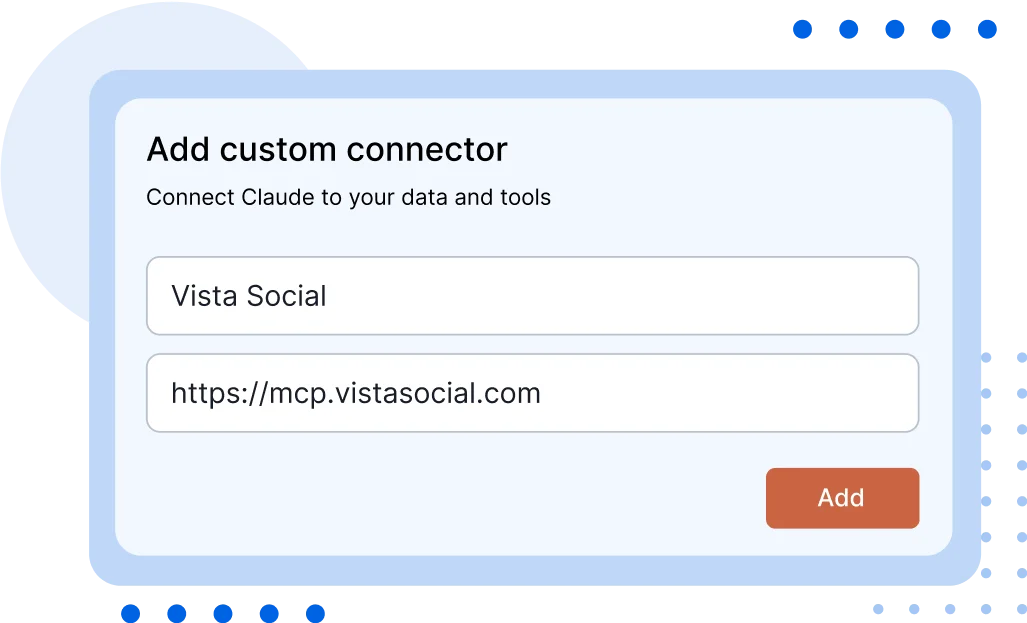
Connect easily
No code to download, no local proxy. Plug our hosted MCP URL into your favorite AI client and you’re live.
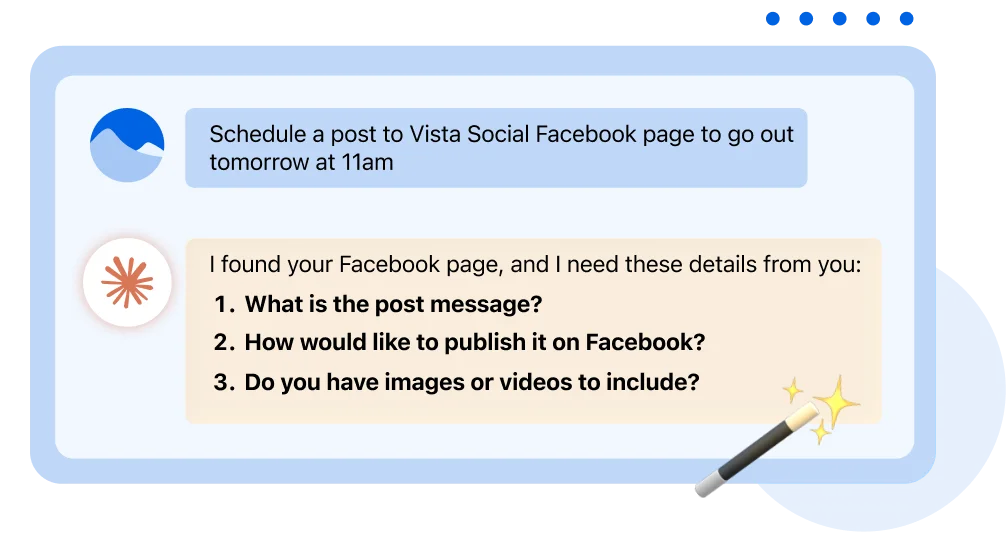
Schedule posts with ease
Let your AI handle captions, media and timing. Works across every network you’ve connected.
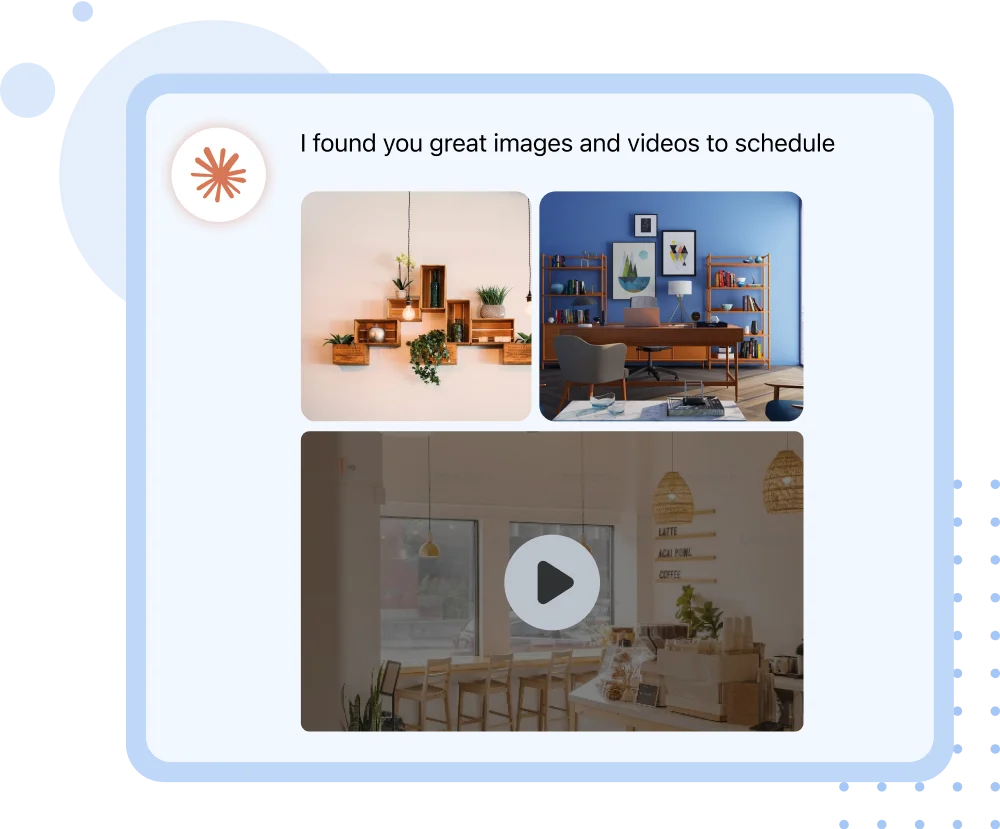
Get help with sourcing content
Ask your AI to find images, videos, GIFs — from your library or the web — and drop them straight into a post.
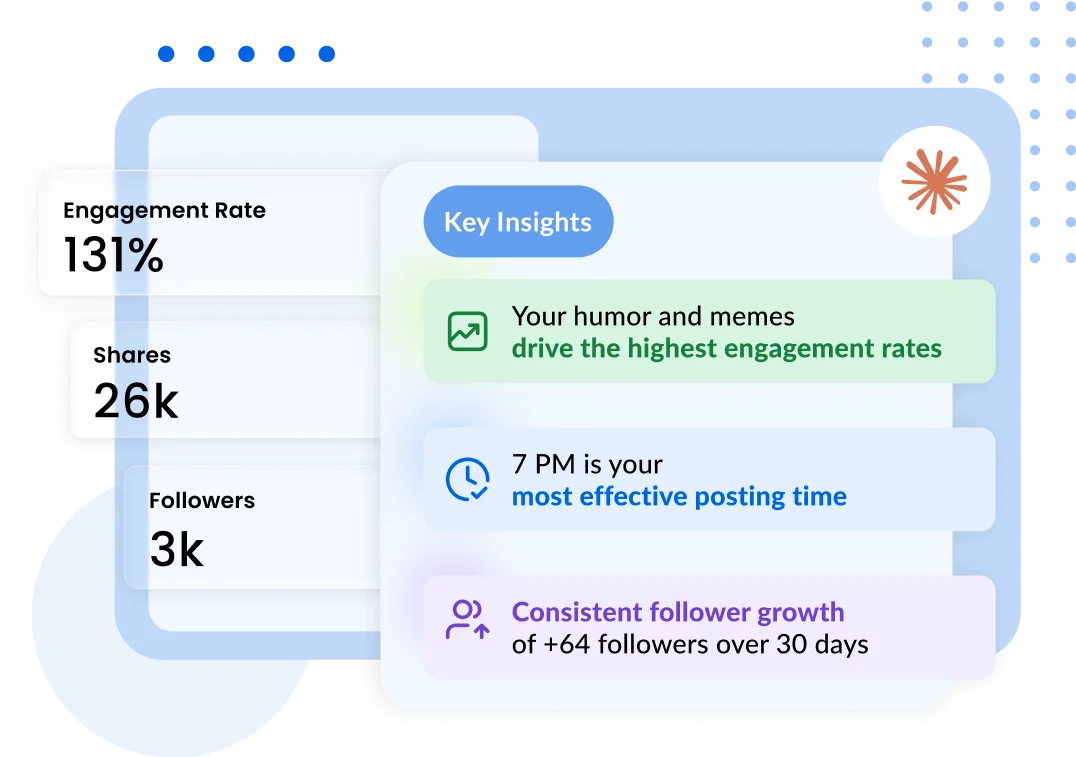
Get AI to make sense of your metrics
Benchmarks, sentiment, top posts, best send times — your AI explains what changed and why.
Get started
Your AI is not a social manager yet. Let's fix that today.
Turn Claude, ChatGPT, Cursor, and more into your social media teammate with Vista Social MCP.
No credit card required · Free trial available · Cancel anytime
Frequently asked questions
What is MCP (Model Context Protocol)?

MCP (Model Context Protocol) is a standardized, secure way for AI assistants — powered by Large Language Models — to request information from and take actions in external systems like Vista Social. Think of it as a shared language that lets your AI ask your tools for context (e.g., "Show me last week's top posts") and perform tasks on your behalf (e.g., "Schedule tomorrow's launch post") without you ever opening a dashboard.
What are some examples of things I could do with it?
Here are real prompts you can run against the Vista Social MCP Server:
"What social profiles do I have connected?"
"List posts published in the last 30 days and order by most impressions."
"Schedule a post to my Facebook page and Instagram profile for tomorrow at 9am."
"How are my social posts performing this month vs. last month?"
"Email a copy of my latest performance report to my client."
"Draft friendly replies to my unanswered DMs from the last 48 hours."
"Create 3 content ideas per client for next week across Instagram and TikTok."
Who is this for?
Anyone using an MCP-compatible AI client like Claude Desktop, Cursor, ChatGPT (custom connectors), Gemini, Windsurf, or Zed. Instead of logging into Vista Social to click around, you can simply ask your AI to do it for you.
Which AI clients work with it?
Anything that supports MCP. Today that includes Claude Desktop, Cursor, ChatGPT (custom connectors), Gemini, Windsurf, and Zed, with more added by the MCP ecosystem every month.
Does MCP cost extra?
No. The Vista Social MCP server is included in every paid Vista Social plan at no extra cost during beta.
What can the AI see and do?
Exactly what you can. The MCP connection is authenticated and scoped to your Vista Social account and your role. If you can't see a profile in Vista Social, neither can your AI.
Can I limit what the AI can do?
Yes. Access follows your Vista Social role permissions. You can also disconnect the MCP token at any time from Settings → Integrations, which revokes every AI client instantly.
Is my data stored by the AI?
Vista Social only transmits the data your AI explicitly requests. Whether your AI client caches or stores that data is governed by the AI client's own privacy policy (Claude, Cursor, ChatGPT, etc.).
Does it work with white-label?
Yes. White-label customers can expose the Vista Social MCP server to their own end clients, fully branded under their domain.
How do I get started?
In your Vista Social dashboard, go to Settings → Account Settings → Integrations and copy your MCP connect link. Paste that link into your AI client as a custom MCP connector, and you're live. Once connected, just ask your AI what you want — no code required.
Do I have to be a developer to use this?
Not at all. If you can copy and paste a link, you can use Vista Social MCP. Every AI client that supports MCP has a simple "Add a custom connector" or "Add MCP server" setting where you paste the URL.


The most complete social media management platform for teams who demand more.



Tools
PublishingAnalyticsEngagementIntegrations
FacebookInstagramLinkedInRedditSnapchatThreadsTikTokX (Twitter)YouTubeBlueskyVista Page (link-in-bio)All IntegrationsCopyright © 2026 Vista Social LLC. All Rights Reserved.