

Published on April 21, 2026
11 min to read
The AI Social Media Audit: How to Use AI to Find What’s Actually Wrong With Your Strategy

Summarize with AI

Table of contents
Summarize with AI

ChatGPT

Claude

Perplexity
Share

Vista Social

X (Twitter)


You already know you should be auditing your social media accounts more regularly.
The problem is that a proper manual audit, pulling exports from every platform, scanning profiles, cross-referencing performance data, and turning it all into something a client can actually act on, can swallow an entire working day.
So it keeps getting bumped, and meanwhile the strategy drifts quietly in the wrong direction.
AI earns a place in this workflow—not by writing captions, but by doing the kind of deep analytical work that used to make audits painful for anyone who loves their job but isn’t naturally data fluent.
With the right prompts and a clean data setup, a thorough AI social media audit becomes a focused half-day task (or less!) rather than a full-day grind, and the findings are often sharper than what a time-pressured manual review produces anyway.
This guide walks through every step, with specific prompts and practical ways to use Vista Social’s AI features throughout.
Table of contents
What is an AI social media audit?
A social media audit is a structured review of every active social account you manage, covering things like:
- Content performance
- Audience alignment
- Brand consistency
- Competitive positioning
The goal is to identify what’s working, what isn’t, and where the strategy has quietly shifted off course.
An AI social media audit uses the same framework but hands the pattern recognition and synthesis to a large language model like Claude or ChatGPT. You feed it organized exports, screenshots, and content samples, prompt it with specific questions, and get synthesized findings back in minutes. The strategic judgment stays with you throughout.
Download our free social media audit template to use alongside this guide.

Why use AI to audit your social media presence?
Running a social media audit manually is one of those tasks that are genuinely useful but chronically deprioritized, because the time it asks for keeps it off the to-do list.
Between exporting data from multiple platforms, cross-referencing post performance, reviewing profiles, and pulling competitor context, you’re looking at several hours of work before you’ve even written a single insight.
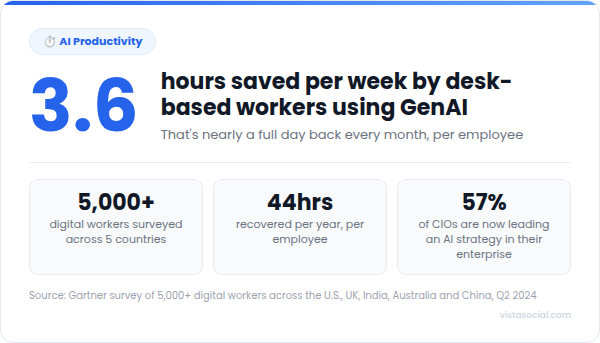
AI doesn’t replace that thinking, but what it does is compress the collection and analysis phases significantly, so the part of the audit that requires your brain, the strategic interpretation and decision-making, gets more of your time and attention.
Here’s what that looks like in practice:
| Benefit | What it means in practice |
| Pattern recognition at scale | AI can scan 90 days of posts and tell you that your Thursday content consistently underperforms every other day, the kind of detail that disappears in manual review |
| No confirmation bias | After managing an account for a year, you’ve formed assumptions about what’s working. AI reads the data without any of them |
| Repeatable structure | A prompt-based audit follows the same process every quarter, so findings become genuinely comparable over time |
| Practical at agency scale | For teams managing multiple client accounts, quarterly manual audits simply don’t happen. AI makes them fast enough to actually run on schedule |
How to conduct an AI social media audit
Eight steps sounds like a lot. In practice, steps one and two are setup work, steps three through six are analysis runs you can do back to back with your data open, step seven takes about ten minutes if your prompts are clean, and step eight is a one-time habit you build once and repeat forever.
Done properly, the whole thing can be completed in a few short hours.
Step 1: Define the audit’s purpose and scope
A vague audit produces vague findings, so before pulling any data, you need to decide what question you’re actually trying to answer. This step is fully human, and it shapes every prompt that comes after it.
The four most common audit goals:
- Performance diagnosis: Why have results dropped or plateaued?
- Competitive positioning: How does this account compare to the competition?
- Brand consistency check: Are all active accounts presenting the same identity?
- Pre-strategy reset: Building an honest baseline before starting something new
Once the goal is clear, lock in the scope:
- Platforms: Which channels are you reviewing?
- Timeframe: 60 to 90 days is the sweet spot for most accounts, recent enough to reflect current reality and long enough to show genuine patterns
- Accounts: Yours, plus two to five competitors if benchmarking is part of the brief
Step 2: Gather your raw data
Everything that follows depends on the quality of what you feed into AI. Thin data produces thin findings, so it’s worth being thorough here.
What to collect:
- Native analytics exports (CSV) from each platform, covering posts, engagement, reach, follower growth, and audience demographics
- Screenshots of each profile page, including the bio, pinned posts, highlights, and link-in-bio
- Competitor data you can access publicly, including posting cadence, format mix, approximate follower counts, and visible engagement levels
How to export your data from Vista Social
Rather than logging into each platform separately to download individual exports, Vista Social pulls all your data into a single report in a few quick steps:
1. Go to Reports in your Vista Social dashboard.
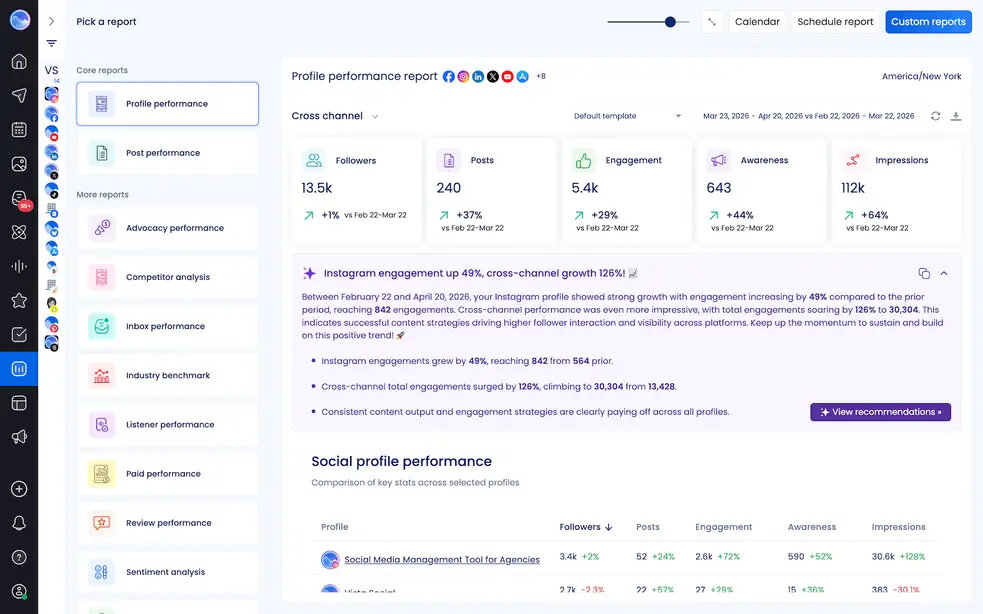
2. Select the social profiles you want to include in the audit.
3. Choose Profile performance as the report type.
4. Set your date range to 60 or 90 days.
5. Click the export icon at the top right and select CSV.
Then, to dive into post-level detail, export the Post performance report using the same steps.
Once you have your data, check Vista Social’s AI report summaries on your Profile and Post performance reports (these are only available on cross-platform reports) before opening a single prompt. The AI automatically surfaces key patterns and recommendations, giving you a useful first read that shapes how you approach the deeper analysis ahead.
A note on MCP: If you’re connected to Vista Social via the MCP integration, you can skip the manual export step entirely.
Rather than downloading CSVs, you can ask Claude or ChatGPT directly, “List all posts published in the last 90 days across my connected profiles and sort them by engagement rate,” and get the data back in the same window you’ll be running your audit prompts in.
That’s the kind of workflow that turns a half-day audit into something even faster and even more valuable.
Step 3: Audit brand consistency with AI
Feed your profile screenshots and 10 to 15 recent posts per platform into Claude or ChatGPT.
Use this prompt:
“Review these social media profiles and recent posts. For each platform, evaluate: visual consistency (colors, imagery style, logo usage), tone of voice consistency, whether the bio communicates the brand’s value proposition clearly in under 10 seconds, and whether a new visitor would understand what this brand does within five seconds of landing on the profile. Give me a brief scorecard for each platform with one thing working and one thing that needs attention.”
What this typically surfaces is the kind of inconsistency that’s easy to overlook when you’re inside an account every day. Instagram and TikTok might be visually tight and on-brand, while the LinkedIn bio still references a service discontinued two years ago, or the profile photo is a different crop of the logo than every other channel. Small things individually, but they create real friction for anyone encountering the brand across more than one platform.
The output from this step is a consistency scorecard per platform, giving you a clear, prioritized list of quick wins before you even get into performance data.
Step 4: Analyze content performance patterns
Upload your Post performance CSV to your AI tool and work through these prompts one at a time. Keeping each prompt focused on a single variable produces cleaner, more specific findings than bundling everything into one question.
Prompts to run:
- “Rank my top 10 and bottom 10 posts by engagement rate. For the top performers, identify any patterns in caption structure, topic, or format. For the bottom performers, what do they have in common?”
- “Break down performance by content format (video, carousel, image, or link post). Which format delivers the highest average engagement rate and which the lowest?”
- “Is there a pattern in the day or time of day for my best-performing posts?”
- “Group posts by topic or theme. Which categories consistently outperform, and which consistently underperform?”
- “Looking specifically at saves and shares, do those posts share any patterns separate from high-like posts?”
That last prompt deserves particular attention because saves and shares are high-intent signals that raw engagement rates routinely obscure. An audience bookmarking content to return to later is a meaningfully different signal from one that double-tapped while scrolling past, and the difference matters when you’re deciding what to produce more of.
Vista Social use case: If you’re using MCP, try prompting Claude or ChatGPT directly with something like, “From my last 90 days of posts, which content format had the highest average engagement rate, and which topic cluster generated the most saves?”
Vista Social pulls the live data and your AI returns the analysis without a messy spreadsheet ever opening. For those not yet on MCP, the Post Performance CSV exported in Step 2 gives you everything you need to run the same prompts manually.
Reporting tip: Once the AI surfaces its findings, use Vista Social’s custom report builder to package them into something client-ready.
Go to Reports > Custom reports > New template > Custom report to choose exactly which metrics and sections to include, which to leave out, and where to add written commentary explaining what the data means.
For agencies, the report can be white-labeled and delivered directly to clients without any additional design work.
Step 5: Audit audience and voice alignment
This step requires some manual effort because comment and DM data can’t be bulk-exported through most third-party tools. Head into Vista Social’s unified inbox and collect 50 to 100 recent comments and messages across your active platforms.
Because Vista Social automatically tags every conversation with a sentiment label (positive, negative, mixed, or neutral), filtering before you pull the sample means you’re working with a genuine cross-section of audience reactions rather than cherry-picking only your most favorable interactions.
Paste that sample into your AI tool and use this prompt:
“Based on these comments and messages, characterize who is actually engaging with this brand. What language do they use? What questions come up most often? What pain points surface repeatedly? What genuinely excites them? Then compare that characterization to this target audience description: [paste your ICP]. Where are the gaps between who’s actually engaging and who we’re trying to reach?”
This gap analysis is consistently the most revealing output an audit produces. Audience drift is quiet by nature, and an account can spend months attracting a slightly different audience from the one the strategy was built for without anyone noticing until you step back and compare the two directly.
Vista Social use case: If you’re on MCP, you can pull inbox sentiment data directly into your audit conversation. Try: “From the last 7 days of inbox activity, summarize the main sentiment themes and flag any recurring negative topics with examples.”
That output feeds directly into your audience alignment prompt without needing to copy and paste a single comment manually.
Step 6: Competitive benchmarking
Collect five to ten recent posts from each competitor you identified in step 1. Combine those with the structured data available through Vista Social’s Competitor Analysis report, which covers fan growth, post frequency, and publishing behavior across Facebook, Instagram, and X without manual scrolling.
Then run this prompt:
“Analyze these competitor posts. Identify their recurring content pillars, posting cadence and format mix, the tone they use, and what types of posts generate the most engagement. Then build a gap list: what are they doing consistently that we aren’t, and where do we have a clear advantage?”
The output is a positioning map showing where each competitor has concentrated their content effort and where the gaps are that you could be filling. The structured data from Vista Social shows you the patterns, and the AI prompt tells you what they mean for your strategy.
Step 7: Synthesize into findings and an action plan
At this point you have outputs from five separate focused audit prompts.
Pull them together with this final synthesis:
“Based on all of the analysis from this session, draft a one-page audit summary: three strengths in the current strategy, three weaknesses or gaps, three opportunities worth testing in the next 30 days, and three specific actions to prioritize first. Keep each point to two sentences maximum.”
Before acting on the output, run it through one human review. This is the pressure-test step: check every recommendation against what you actually know about the account, the available resources, campaigns already in the pipeline, and past experiments that didn’t deliver. AI synthesizes what the data shows, and your judgment determines what to do with it.
Here’s the kind of summary you’re aiming to walk into a client meeting with:
| Category | Findings |
| Strengths | Strong brand voice on Instagram, consistent posting cadence, high carousel engagement rate |
| Weaknesses | Outdated LinkedIn bio, carousel format underused, audience-strategy mismatch |
| Opportunities | Reintroduce two carousels per week, test content aligned to actual audience behavior, refresh all platform bios |
| Priority actions | Update LinkedIn bio this week, add two carousels to next week’s calendar, propose a 4-week content test based on audience gap findings |
Step 8: Set up the re-audit cadence
Quarterly is a solid default for most accounts, frequent enough to catch drift before it compounds into a real strategic problem, and spaced far enough apart that each audit reflects genuine change rather than just noise.
After your first AI audit, build two simple habits:
- Save every prompt in a shared doc labeled by date and account. Over time, that becomes a reusable template that makes each subsequent audit faster and more consistent
- Record the key findings alongside the prompts so you can compare across quarters and track whether the work actually moved anything
Vista Social use case: For ongoing audits, Vista Social’s MCP integration with Claude or ChatGPT removes the data collection step from your workflow entirely.
Rather than downloading exports at the start of each audit cycle, you open a conversation and ask for what you need: “What has our Instagram posting cadence been this quarter?” or “Show me engagement trends across all connected profiles for the last 90 days.”
Your AI gets the data, and you get straight to the analysis. Our guide on AI social media reporting covers how to build that connected workflow in full.
Try Vista Social for free
A social media management platform that actually helps you grow with easy-to-use content planning, scheduling, engagement and analytics tools.
Get Started NowAbout the Author

Content Writer
Orion loves to write content that refuses to be boring. As part of Vista Social, he helps brands, creators, and agencies stop doom scrolling and start winning with social media. When he's not in front of a keyboard, he's watching films in IMAX with his wife, dissecting football tactics (the European kind), and getting lost in a good book.
Loading related tools...

The most complete social media management platform for teams who demand more.




Tools
PublishingAnalyticsEngagementIntegrations
FacebookInstagramLinkedInRedditSnapchatThreadsTikTokX (Twitter)YouTubeBlueskyVista Page (link-in-bio)All IntegrationsCopyright © 2026 Vista Social LLC. All Rights Reserved.